
How to send texts in your customer's language in CartBoss
For multilingual SMS in CartBoss, add a translation for each language under Message translations; each shopper gets the one for their country's language. Shoppers whose language has no translation get the default message.
Before you begin
- Preset messages are already translated by CartBoss. You add translations only to your custom messages. See How to write your own abandoned cart text.
- Write the default message first. It is the text every language falls back to.
How CartBoss picks the language
- The language comes from the shopper's country, not from their browser or phone settings.
- CartBoss takes the country from the checkout. If it has none, it uses the shopper's location or phone number.
- If your message has a translation for that country's language, the shopper gets it. If not, they get the Default message.
- Shoppers in English-speaking countries get the default message.
Add a translation
- Click Abandoned cart (or Win-Back) in the left menu, under Messaging.
- Click the pencil next to your custom message, or Add custom message.
- Write the Default message, if you haven't yet.
- Under Message translations, click a language. Its box shows the default message in grey as a guide.
- Type the translation. Keep every shortcode exactly as it is, for example {FirstName}.
- Add {CheckoutUrl} (in a Win-Back text: {SiteUrl}) to the translation. Each translation needs its own link.
- Repeat for each language you sell in.
- Click Save.

Each language button has a dot: dark while the language is empty, coloured once it has a translation.
Remove a translation
- Click the language under Message translations.
- Delete all the text in its box.
- Click Save. Shoppers in that language now get the default message.
Find messages without translations
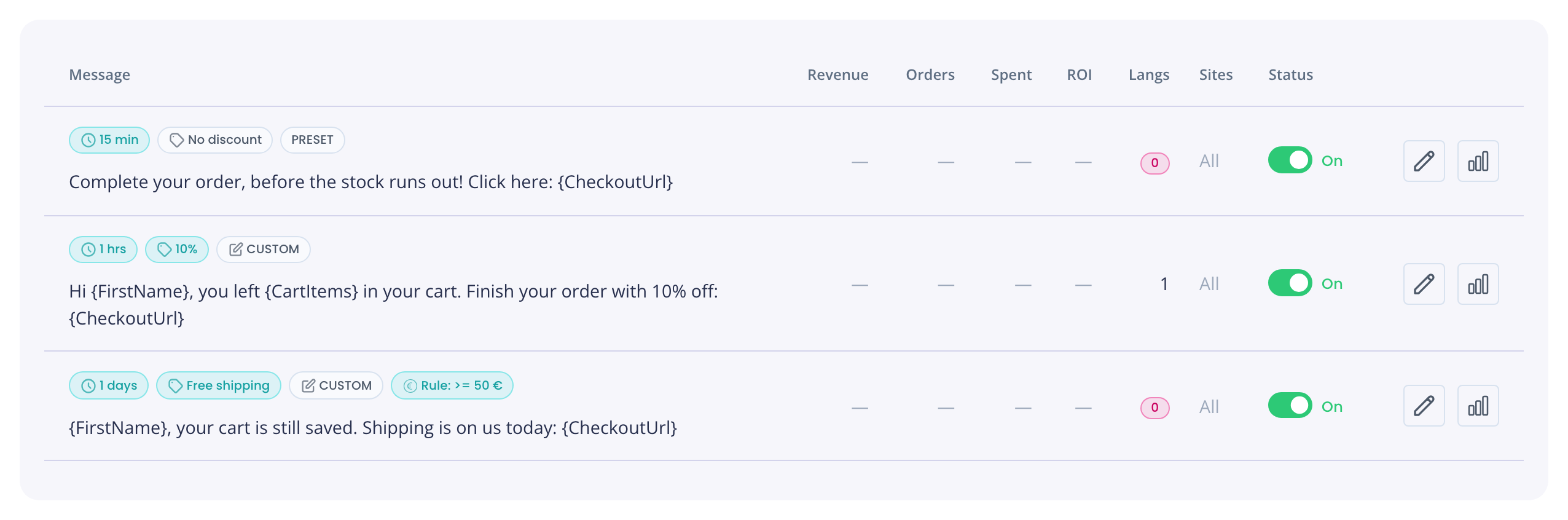
- In the message list, click the Untranslated filter.
- The Langs column shows how many translations a message has. A red 0 means everyone gets the default message, whatever language they speak.
Good to know
- CartBoss does not check translations for misspelled shortcodes or a missing link. Check them yourself before you save.
- A discount travels only on links in the text the shopper gets. A translation without a link carries no discount. See How to add a discount.
- The length meter counts only the default message. Some languages use special characters that make a text longer in SMS parts. See How to keep a CartBoss text to one SMS part.
- Links in the text, including the stop link, open in the shopper's language where your store supports it.
Questions
Do I need a translation for every language?
No. Add only the languages of the countries you sell to. Everyone else gets the default message.
A French-speaking shopper got the English text. Why?
CartBoss goes by the shopper's country. Either their country's language is not French, or the message has no French translation.
Can I write the default message in another language?
Yes. It is sent to everyone without a matching translation, so write it in the language most of those shoppers read.
Can I send a different text per store instead?
Yes, with Website targeting. See How to send different texts for each store.